728x90

1. 경량 패턴 ( Flyweight Pattern ) 정의

  • 데이터의 일부를 다른 개체와 공유하여 메모리 사용을 최소화하는 패턴


2. 중복된 데이터가 사용된 예시
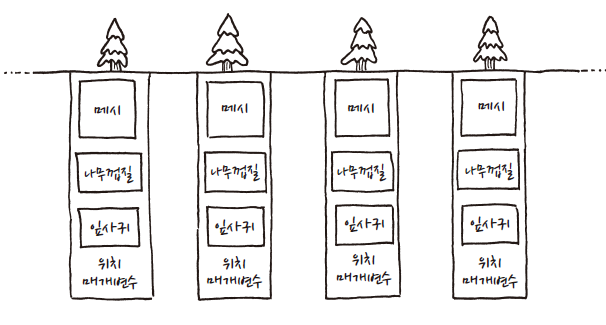
// 코드로 표현한 나무
class Tree
{
private:
	FMesh Mesh;
	FTexture Bark;
	FTexture Leaves;
	FVector2D Position;
	double Height;
	double Thickness;
	FColor BarkTint;
	FColor LeafTint;
};
  • 동일한 나무를 그리지만, 메시, 나무껍질, 잎사귀 등 동일한 데이터가 중복돼 있다.


3. 중복된 데이터를 공유한 예시
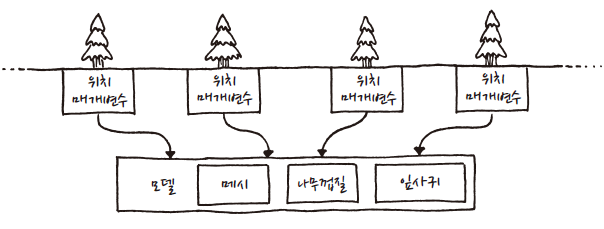
 

// 중복된 데이터
class TreeModel
{
private:
	FMesh Mesh;
	FTexture Bark;
	FTexture Leaves;
};

// 코드로 표현한 나무
class Tree
{
private:
	// 공유된 데이터
	TreeModel* Model;

	FVector2D Position;
	double Height;
	double Thickness;
	FColor BarkTint;
	FColor LeafTint;
};
  • 게임 내 동일한 메시와 텍스처는 한 번만 메모리에 올리면 되기 때문에, TreeModel 객체는 하나만 존재한다.
  • 나무 인스턴스는 공유 객체인 TreeModel을 참조하되, 인스턴스 별로 다른 상태 값만 남겨둔다.
  • 공유할 수 있는 데이터를 고유 상태 ( 메시, 나무껍질, 잎사귀 등 )
  • 인스턴스 별로 값이 다른 데이터를 외부 상태 ( 위치, 색상 등 )라고 부른다.

4. 코드 사용 예시

class Terrain
{
public:
	Terrain( int InMovementCost, bool InIsWater, FTexture InTexture )
		: MovementCost( InMovementCost ), bWater( InIsWater ), Texture( InTexture ) {}

	int GetMovementCost() const { return MovementCost; }
	bool IsWater() const { return bWater; }
	const FTexture& GetTexture() const { return Texture; }

private:
	int MovementCost;
	bool bWater;
	FTexture Texture;
};

class World
{
public:
	World()
		:GrassTerrain( 1, false, GRASS_TEXTURE ),
		 HillTerrain( 3, false, HILL_TEXTURE ),
		 RiverTerrain( 2, true, RIVER_TEXTURE ) {}

	void GenerateTerrain();

	const Terrain& GetTile( int InX, int InY );

private:
	Terrain* tiles[ WIDTH ][ HEIGHT ];

	Terrain GrassTerrain;
	Terrain HillTerrain;
	Terrain RiverTerrain;
};

void World::GenerateTerrain()
{
	for ( int x = 0; x < WIDTH; ++x )
	{
		for ( int y = 0; y < HEIGHT; ++y )
		{
			//if ( 조건1 )
				tiles[ x ][ y ] = &HillTerrain;
			//else if ( 조건 2 )
				tiles[ x ][ y ] = &GrassTerrain;
			//else
				tiles[ x ][ y ] = &RiverTerrain;
		}
	}
}

const Terrain& World::GetTile( int InX, int InY )
{
	return *tiles[ InX ][ InY ];
}
  • 공유할 수 있는 고유 상태는 Terrain 객체로 묶어서 사용했다.
  • 타일을 구성할 때 각각의 Terrain 객체들을 공유해 사용함으로써 메모리를 절약할 수 있다.
반응형
728x90

1. 명령 패턴 ( Command Pattern ) 정의

  • 함수 호출을 객체로 감싸는 것이다.


2. 함수를 직접 호출하는 코드

// Jump(), FireGun() 등 함수를 직접 호출하는 방식의 코드
void InputHanler::HandleInput()
{
	if      ( IsPressed( ButtonX ) ) Jump();
	else if ( IsPressed( ButtonY ) ) FireGun();
}
  • 함수를 직접 호출하는 경우 코드를 이해하기는 쉽지만, 입력 키 변경이 불가능하다.


3. 명령 패턴을 이용하여 객체화

// 공통 상위 클래스 정의
class Command
{
public:
	virtual ~Command() {}
	virtual void Execute() = 0;
};

// Jump() 함수 호출을 객체화
class JumpCommand : public Command
{
public:
	virtual void Execute() { Jump(); }
};

// FireGun() 함수 호출을 객체화
class FireGunCommand : public Command
{
public:
	virtual void Execute() override { FireGun(); }
};


4. 함수를 직접 호출하는 코드 대신, 객체화된 소스 호출

class InputHandler
{
public:
	void HandleInput();

private:
	Command* ButtonX;
	Command* ButtonY;
};

void InputHandler::HandleInput()
{
	if      ( IsPressed( BUTTON_X ) ) ButtonX->Execute();
	else if ( IsPressed( BUTTON_Y ) ) ButtonY->Execute();
}


  • ButtonX, ButtonY에 어떤 버튼을 할당하느냐에 따라 호출되는 함수가 변경된다.
  • 함수를 직접 호출하는 코드와 달리, 입력 키 변경이 가능하다.
  • 전역 함수만 호출하도록 된 소스이므로, 액터 지시를 통해 단점 보완이 필요하다.


5. 액터에게 지시하기

// 공통 상위 클래스 정의
class Command
{
public:
	virtual ~Command() {}
	virtual void Execute( GameActor& InActor ) = 0;
};

// Jump() 함수 호출을 객체화
class JumpCommand : public Command
{
public:
	virtual void Execute( GameActor& InActor ) { InActor.Jump(); }
};

// FireGun() 함수 호출을 객체화
class FireGunCommand : public Command
{
public:
	virtual void Execute( GameActor& InActor ) override { InActor.FireGun(); }
};

// 입력한 버튼에 대한 명령 객체 반환.
Command* InputHandler::HandleInput()
{
	if      ( IsPressed( BUTTON_X ) ) return ButtonX;
	else if ( IsPressed( BUTTON_Y ) ) return ButtonY;

	// 키 입력이 없는 경우
	return nullptr;
}
	// 명령 객체를 반환받아 액터에게 행동을 지시한다.
	Command* command = inputHandler.HandleInput();
	if ( command )
		command->Execute( actor );
  • HandleInput() 함수를 통해 명령 객체를 반환받아, 특정 액터가 명령을 실행할 수 있도록 한다.
반응형
728x90

1. 교착 상태 정의

  • 두 스레드가 서로를 기다리는 상황

2. 교착 상태 예시

#include <iostream>
#include <Windows.h>
#include <thread>
#include <mutex>

class CriticalSection
{
private:
	CRITICAL_SECTION m_critSec;

public:
	// 생성자
	CriticalSection();

	// 소멸자
	~CriticalSection();

	void Lock();
	void UnLock();
};

CriticalSection::CriticalSection()
{
	InitializeCriticalSectionEx( &m_critSec, 0, 0 );
}

CriticalSection::~CriticalSection()
{
	DeleteCriticalSection( &m_critSec );
}

void CriticalSection::Lock()
{
	EnterCriticalSection( &m_critSec );
}

void CriticalSection::UnLock()
{
	LeaveCriticalSection( &m_critSec );
}

class CriticalSectionLock
{
private:
	CriticalSection* m_pCritSec;

public:
	// 생성자
	CriticalSectionLock( CriticalSection& InCritSec );

	// 소멸자
	~CriticalSectionLock();
};

CriticalSectionLock::CriticalSectionLock( CriticalSection& InCritSec )
{
	m_pCritSec = &InCritSec;
	m_pCritSec->Lock();
}

CriticalSectionLock::~CriticalSectionLock()
{
	m_pCritSec->UnLock();
}

int a;
CriticalSection a_mutex;
int b;
CriticalSection b_mutex;

int main()
{
	
	std::thread t1( []()
	{
		while ( true )
		{
			CriticalSectionLock lock1( a_mutex );
			a++;
			CriticalSectionLock lock2( b_mutex );
			b++;
			printf( "thread1 a : %d, b : %d\n", a, b );
		}
	} );

	std::thread t2( []()
	{
		while ( true )
		{
			CriticalSectionLock lock1( b_mutex );
			b++;

			CriticalSectionLock lock2( a_mutex );
			a++;
			printf( "thread2 a : %d, b : %d\n", a, b );
		}
	} );

	t1.join();
	t2.join();
}

  • 두 스레드는 잠금과 해제를 반복하다가 어느 순간에 교착 상태에 빠지게 된다.


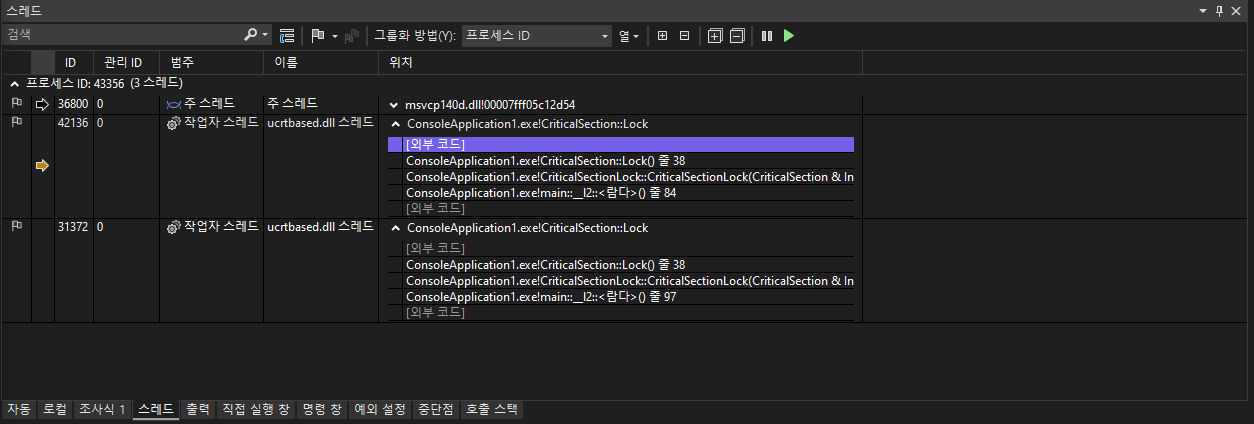
3. 디버그 -> 창 -> 스레드 확인 시 현재 2개의 스레드 상태 확인

  • 교착 상태가 발생한 스레드 주소 16진수에서 10진수로 변경 시 문제가 되는 스레드 확인이 가능하다
  • 42136 스레드 교착 상태 : ( 16진수 ) 0x0000000000007a8c-> ( 10진수 ) 31372 
  • 31372 스레드 교착 상태 : ( 16진수 ) 0x000000000000a498-> ( 10진수 ) 42136
  • 두 스레드 콜스택 확인 시 서로를 기다리며 교착상태가 발생한 것을 확인할 수 있다.
반응형

'C++ > 게임 서버 프로그래밍' 카테고리의 다른 글

[Game Server] 임계 영역과 뮤텍스  (0) 2022.07.12
728x90

1. 뮤텍스( mutex ) 정의

  • 뮤텍스( mutex )는 상호 배제( mutual exclusion )의 줄임말이며 경쟁 상태를 해결하는 방법 중 하나

2. 사용 방법

int main()
{
	// 뮤텍스 선언
	std::mutex mutex1;

	// 뮤텍스 락
	mutex1.lock();      

	// 함수 사용
	func1();     
	
	// 뮤텍스 잠금 해제 
	mutex1.unlock();     
}
  • C++ 표준 객체 std::mutex 사용 예시


int main()
{
	// 뮤텍스 선언
	std::recursive_mutex mutex2;

	// 뮤텍스 락
	std::lock_guard< std::recursive_mutex > lock( mutex2 );

	// 함수 사용
	func1();
}
  • std::mutex 사용 시 예외 발생으로 인해 unlock() 함수 실행이 안될 수 있다.
  • std::recursive_mutex는 로컬 변수가 파괴될 때, 파괴자 함수에서 unlock() 함수가 자동으로 실행되도록 함.


[참고]

https://en.cppreference.com/w/cpp/thread/recursive_mutex

반응형

'C++ > 게임 서버 프로그래밍' 카테고리의 다른 글

[GameServer] 교착 상태 디버깅  (0) 2022.07.13

+ Recent posts